
Micaforeveryone
MicaForEveryone: A Complete Guide to MicaForEveryone for Windows Customization
Windows users often enjoy personalizing their desktops to create a cleaner and more modern experience. One tool that has gained attention among customization enthusiasts is MicaForEveryone. Designed to bring Microsoft’s Mica material effect to more desktop applications, MicaForEveryone allows users to enhance the appearance of supported programs without changing their core functionality.
Whether you’re a casual Windows user or a customization enthusiast, understanding MicaForEveryone can help you create a more visually appealing desktop.
What Is MicaForEveryone?
MicaForEveryone is an open-source Windows customization utility that enables the Mica material effect for compatible desktop applications. Inspired by Microsoft’s Windows design language, the tool extends the Mica visual effect beyond apps that support it by default, giving users a more consistent desktop appearance.
It is especially popular among Windows 11 users who appreciate modern interface design.
Why MicaForEveryone Is Popular
Several features have contributed to the growing popularity of MicaForEveryone.
Modern Visual Design
It helps bring the elegant Mica effect to supported applications.
Lightweight Utility
The software is designed to provide visual enhancements without major system changes.
Open-Source Development
Being open source allows community contributions and transparent development.
Windows Customization
Users can personalize their desktop while maintaining a native Windows look and feel.
Key Features of MicaForEveryone
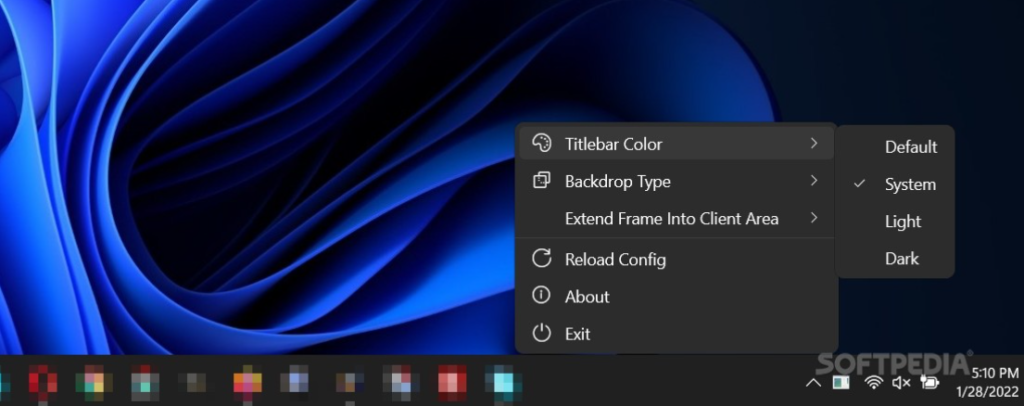
MicaForEveryone includes several useful capabilities.
Mica Material Support
Apply the Windows Mica effect to compatible desktop windows.
Multiple Appearance Options
Customize visual behavior to match your preferred desktop style.
Easy Configuration
Simple settings make it accessible for both beginners and experienced users.
Community Updates
Regular improvements help maintain compatibility with newer Windows versions.
Benefits of Using MicaForEveryone
Installing MicaForEveryone offers several advantages.
Enhanced Desktop Appearance
Create a cleaner and more modern interface.
Better Visual Consistency
Many supported applications can share a similar Windows design language.
Personalization
Adjust visual settings to match your preferred desktop theme.
Lightweight Experience
The utility focuses on appearance without replacing the Windows interface.
How to Get Started with MicaForEveryone
If you’re interested in using MicaForEveryone, a few best practices can help.
Check Windows Compatibility
Ensure your Windows version supports the required visual features.
Download from the Official Project
Always obtain the software from the official project page or trusted repositories.
Read Documentation
Review the installation guide and configuration instructions before making changes.
Keep the Software Updated
Install new releases to benefit from compatibility improvements and bug fixes.
Common Uses of MicaForEveryone
MicaForEveryone is popular in several scenarios.
Desktop Personalization
Improve the appearance of Windows applications.
Consistent User Interface
Apply similar visual effects across multiple supported programs.
Productivity Setups
Create a polished workspace for everyday use.
Windows Enthusiast Projects
Experiment with modern UI customization while preserving system stability.
Frequently Asked Questions
What is MicaForEveryone?
MicaForEveryone is an open-source Windows utility that enables the Mica visual effect for compatible desktop applications.
Is MicaForEveryone free?
Yes. MicaForEveryone is available as an open-source project.
Which operating system works best with MicaForEveryone?
It is primarily designed for modern versions of Microsoft Windows that support the Mica design language.
Does MicaForEveryone change application functionality?
No. Its primary purpose is to enhance the visual appearance of supported application windows.
Is MicaForEveryone suitable for beginners?
Yes. Most users can install and configure it by following the official documentation.
Why is MicaForEveryone included throughout this article?
Using MicaForEveryone naturally throughout the content improves SEO while providing clear, informative, and reader-friendly information.
Conclusion
MicaForEveryone has become a popular choice for Windows users who want to extend the modern Mica design effect to more desktop applications. Its lightweight design, open-source development, and straightforward configuration make it an attractive option for anyone interested in desktop customization. Whether you’re refining your personal workspace or exploring Windows personalization tools, MicaForEveryone offers a simple way to create a more cohesive and modern-looking desktop experience.